|
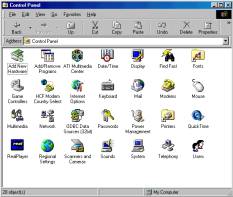
With the impending area code change for the area this particular problem is becoming more and more common. The main cause seems to be that people update their computers area code setting without also updating the NLAmerica area code setting. To update both your area code and your NetLine area code, follow this step by step. _______________________ Step 1. Open your Control Panel. Double click on My Computer and then on Control
Panel.
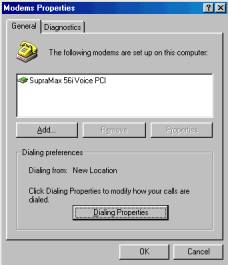
Step 2. Go to the modems section. Double click the modems icon and then
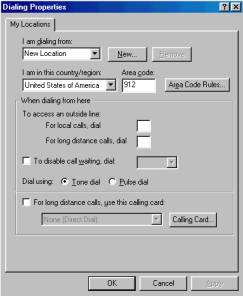
click the Dialing Properties button. Step 3. Update your computers area code. Highlight the current area code
in the Click OK and OK
again to save your changes, then click the X in the upper right
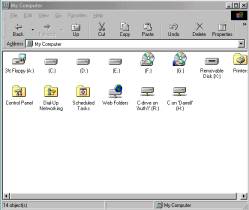
hand corner of the control panel to return to your desktop. Step 4. Open Dial-Up Networking Double click My Computer
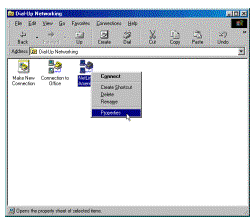
and then Dial-Up Networking. Note: Under Windows ME, Dial-Up Networking is located under the Control Panel. Step 5. Open the NetLine America properties. Right click on your NetLine
America icon with your right mouse button, the left click on the Properties
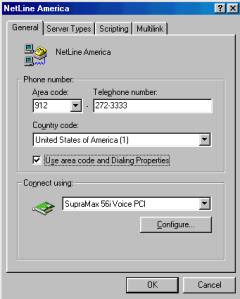
item in the resulting drop down menu. Step 7. Update your Dial-Up Networking settings. Select the current Area code
and change it to 478. As
an extra guard against problems dialing in, you may also un-check the Use
area code and Dialing Properties if you are not currently using extra
features in the Dialing Properties area. Note: Any predial or postdial numbers needed,
can be added to the Telephone number blank on this page. Click OK to save your changes
and close the Dial-Up Networking window to return to the desktop. |
|