|
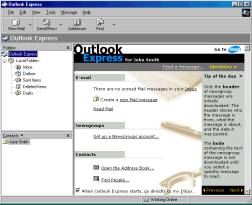
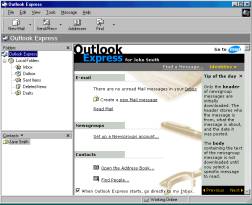
Step 1. Open Outlook Express. Double click the Outlook Express icon on your
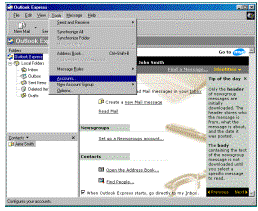
desktop or your start menu. Step 2. Go to the
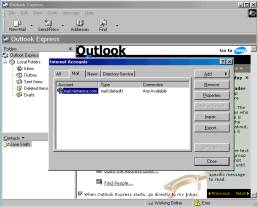
accounts section. Click Tools then click Accounts
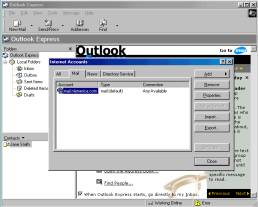
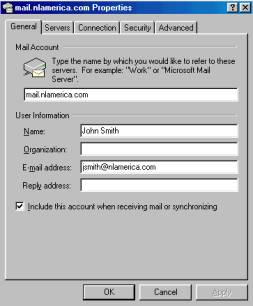
on the Outlook Express menu. Step 3. Bring up your account properties. Click the Mail tab, highlight your NLAmerica email account and click the Properties button. Step 4. Make sure your information is correct. The first blank on this tab is merely a friendly name
and can be anything that will let you describe this account. The Name field should be your full
name such as “John Smith”. The E-mail address field must have
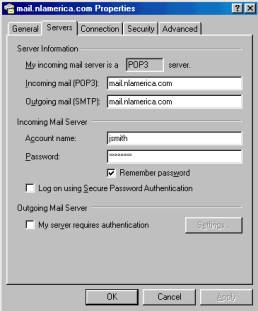
your correct E-mail address such as jsmith@nlamerica.com. If this blank is incorrectly filled out return replies will not get back to you properly. Step 5. Check your server settings. My incoming mail server is a POP3. Incoming mail (POP3) mail.nlamerica.com Outgoing Mail (SMTP) mail.nlamerica.com Account name should be the first part of your E-mail address before the @ sign such as “jsmith”. Put in your password and select Remember password
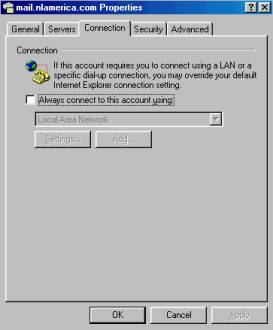
if desired. Step 6. Check your connection settings. I have found the best setting to be to leave the Always
connect to this account using un-checked. Step 7. Finish up and save your changes. Click the OK button to save your
settings and then click the Close button return to Outlook
Express. Step 8. You must close Outlook Express and re-open
the program before any changes you have made take effect. |
|